Tuesday, December 15, 2009

www.imagechef.com

www.imagechef.com is an online photo editing service. I love to edit pictures and I use this site because unlike other sites you can change the background and find yourself in another setting. Editing your pictures is free but you won’t be able to save them so you have to do a screen shot to save your work. Unlike when you subscribe you can save your work, post it and see what other people think, join groups and share the picture. You can share it through Twitter, MySpace, Facebook, send it as an email or any other Social Network you have an account with. You can make a funny picture without using a picture of you or anyone and if you want to use your picture you can make really exciting pictures. I really like this site because it allows me to have fun with a normal picture and turn it into something really funny!


Here's the link to the website : www.imagechef.com

Monday, December 14, 2009

How to quit applications that don't respond and taking screenshots.


Applications can be a great annoyance when they are not responding. They can frustrate the user a lot. However, quitting those applications is easier than you think. On Windows, you can just press 'Control-Alt-Delete', and it will bring up the task manager, where you can quit applications and even terminate processes that are consuming your computer's power. On Mac, things are a little different, there are two ways you can manage your applications, first of all, there is the Activity Monitor, which works just like the Task Manager, it shows you the processes and applications, and you can quit anything that isn't responding and terminate processes. Another way to quit applications that aren't responding is by using the 'force quit' feature, just go to the Apple Menu and press on the Apple logo, and you will find the 'force quit' feature, there, you can quit all the applications that are not responding. Now, screenshots. Taking screenshots is incredibly easy on both Mac and Windows. On Windows, you have to just press printscreen, and voila! You have a screenshot. If this doesn't work, check your preference settings for shortcuts. On Mac, you have to Press Command-Shift-3. This will take a picture of your screen, and will make a sound when the picture is taken, easy as that. Now you know two tips about the system you are using, and hopefully these two tips will help you in the future if any program crashes, or if you want to take a screenshot of your screen.

Open Office


My partner and I found a helpful website, Open Office. This is an open source that you can download on your own computer. It has all the same advantages of Microsoft Office, and it's free! You can make charts, presentations, tables, regular documents and and use any other Microsoft Office feature you can think of. You can even work on an old Microsoft project by uploading it to your computer and continue editing it with Open Office. An interesting feature included with Open Office is that all users can contribute to it's progress, which means that they can give their opinion of how to change it or make it better.  We find it more advanced because of its unique applications ex.) drawing , spreadsheets , formulas , database.


Fotoflexer is an online photo editing website. It Is Free. Fotoflexer, if your used to Photo shop is very similar. You can upload a file from different websites for example my space, face book or google. This program is really simple to use but, you can do a lot with it. You can put a effect on a photo, crop it, adjust the color and much more. We recommend this photo editing site to everyone

Piczo

Piczo is a great website used to create your own blogs, post movies, and even post games for others to play. It is basically like creating your own website. You can edit your website in every way and you can visit other's piczo sites. To start one, go to this site: http://www.piczo.com/, create a user name and password, and begin. MALES DO NOT WORRY. Once you see the website at first glimpse, it looks girly but many other boys join in on the fun for the games and talking to their friends. You can do just about anything on piczo. If you want an example of a piczo website, use this link, (please note the things you find on this site is not all of the things you can do, there are many more options than this.) http://www.devincarroll.piczo.com/, this is my old site which I do not use anymore. Piczo is also a great way to download games and movies.

Picnik.com

ePicnik.com is a advanced photo editing website. You can have fun and just design your photo to whatever your imagination wants to do. You can find most of the tools that are in photoshop and so many more. You can put stickers, effects, and you can edit the photo to any season you want for example in christmas you can put a red nose on your nose and you can put antlers on! Picnik is for free but some of the tools that you use are premium, meaning that you have to pay for some of them. For example, the beautifier tool have to pay for the highlights, lipstick, eye color changer, and the mascara. Hope you have fun using it!!!!

Photobucket!


Photobucket is a fun and entertaining website where you can edit, search, and even save your own photos for FREE! To get started go to www.photobucket.com and sign up. In your account you will be able to manage all of your photos and even videos! You can also add photos you might like from Photobucket to your Photobucket album. You can also edit your photos once you signed up by just adding photos to your album, clicking on the photo you would like to edit and edit! Some other nice things that you can do is search for ANY types of images that you might want to search for and you can add them, as well, to your Photobucket album. This website does not only edit but, it gives you the URL so you can add them to your facebook, myspace, email, and even blogger's account! The best part is that it is free all you have to do is sign up and all your photos and videos will be in a much safer place!

Audiko

Audiko is a site that helps you download Ringtones in a safe way. You can have any song or ringtone you like for example the song "Thriller". If you want to look for it just type it in the Search box, and many links will turn out. Then you click on one of them and pick if your phone is Nokia, iPhone, or old phones. Then you can download and save it. If you were for example looking for the song "Bad Romance" and you couldn't find it, but you have it in your Documents you can Upload the song, edit it to see which part of your song you like, and get the ringtone. The Best part is that it is a safe site, and it is for Free. Here is the Site: www.audiko.com

All My Faves


The website allmyfaves.com is a very unique website that makes your life easier. Instead of going on the internent and looking for the website to do the things you need/want, this website has it. The most common useful websites are there as soon as you go on the website. When you want something specific there are ideas of topics like sports, hotels, games and almost anything you want. Tt is very cool to have this website and trust me it has any website you know of. www.allmyfaves.com


Runescape Tech Tip


Runescape in an online game which can help players be more responsible. During your play on runescape, there will be special events sometimes depending on what holiday it is. When you use your thinking skills, you'll be able to go to that event and solve the problem. Then when you finish you'll get a reward which is an item or lots of cash! By the way, if you ever wanted to have magic or put a magic spell on someone, then this is the game for you. Sounds good eh? Get on Runescape and start your adventure today! http://www.runescape.com/

Monday, December 7, 2009

Frostwire- great download site


Frostwire is a site where you can download songs, movies, games, and much more. You can download this by going to the official site, http://www.frostwire.com/ but it only works for windows , not mac. In my opinion I think it downloads really fast if your computer or laptop is normal speed, because its turbo charged. I think that it is a really fun application because its very exciting and interesting to have new things. Please try because if you don't then you will regret it. I hope you like it as much as I do, have FUN!!!

iphone 3g


iPhone 3g is the best phone ever! You can download from applestore.com free\paid games\ap;icaton and also from itunes. You can go to Hawalli phone store and pay 5 kd, so you can get cydia where you can download soccer\movies\random thems as well you can download ringing tones which are songs and you can download aplications.

Thursday, December 3, 2009

The phone of wonders!

The Phone Of Wonders


The lg arena has a 5 megapixel camera with autofocus and flash. You can also edit your images, crop them, make speech bubbles, and filter parts of the image. The camera is complex and I like that. This phone also has windows movie maker. You can make videos with your pictures, install sounds, and choose what style you would like your video to be. For an example, you could make your video like an old film or snow falling down. Its so cool! This phone also has a great fast browser. It has google, youtube, and blogger all that just come with the phone. There is just so much to do with this phone. It's like a mini computer.

Wednesday, December 2, 2009

Make a Word doc look 10 times better in 60 seconds

Most people see Word as something for just typing essays. I've realized that in a very short amount of time you can make it look so much better. There are ways to add backrounds, fancy titles, borders, pictures, and make it have crazy fonts. Using word it is possible to crop, edit and play with any of your pictures or ones from clip art.

Tuesday, December 1, 2009

Google Wave

Google wave is a new tool from google that allows you to chat with many people at the same time. You can add many people to the wave. The only way that you will get google wave is if you were invited by another google wave member because it is new and in preview only.

Shareflow


Shareflow is a website that allows you to chat with people, upload files, share pictures and documents. Once you join you can send invites to other people then comment on each other's post. When you join Shareflow you can create 5 free flows. The flows are private to you and the people you invite. Click on the links below to see what shareflow is all about or to sign up for your free account!
To learn about Shareflow:
Sign Up to use Shareflow:

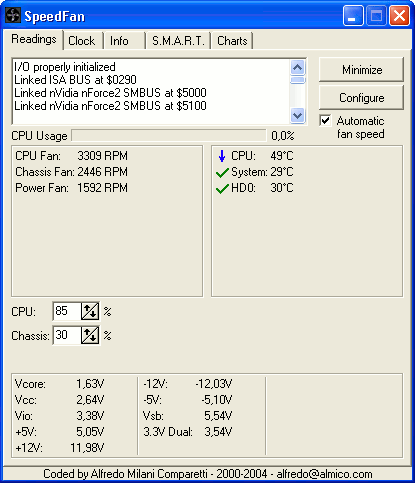
SpeedFan


Speedfan is a fun program which monitors and controls ones computer's temperature and fan speeds to enable them to run with slower speeds. Not all computers will have this chip, so it won’t work for everyone. The normal temperature of a computer is about 40-50° if one writes e-mails/ does homework. During heavy gaming the computer can reach temperatures of 70°. (temperatures get critical once 80°+ is reached) When the program is launched, one can configure many fun things. For example you can set, that your computer will display a small window, beep, or execute a file, if one fan spins to slow or the temperature is too high.
Speedfan is a updated program, where new versions are available once in a while. It is a free program, that can be downloaded at the creators web page -http://www.almico.com/speedfan440.exe


Have fun with it! - but be careful not to play around with it too much

Monday, November 30, 2009

Textbook tech tip....


Our tech-tip is a big help for students who need help with the unit/lesson they're learing in their textbook. If you open up your school textbook to the front page, you will find a website. Which has study guides and games that will help you prepare for a test or quiz. You must do the following steps to get to the lesson you are searching for.


1. Click the subject that you want help with.

2. Click on the country it's from. ( in the front page of the text book )

3. Click on the activity you want to study with.

Feeling the Groove of Grooveshark


Grooveshark, is like, the coolest music website since sliced bread. It's not like pansy pandora, or baby jango, who think they need to give you random songs that you "Might" like. No, Grooveshark treats you like a MAN, it lets you pick your own songs that you want to listen to. Feeling like a playlist? MAKE ONE! With the power of the mouse, and the careful guidance of the website, you will soon learn all of this website's tricks! It's not like Itunes when you listen to thirty seconds of the song and then you are required to buy it, no, Grooveshark knows sometimes you're broke and you just want to listen to some music a friend was all like up in your face going "DUDE, THE MUSIC GODS HAVE BLESSED THIS BAND."


Wednesday, November 25, 2009

Google Chrome

Google Chrome is a faster way to browse the net! Google Chrome will save your six most used websites automatically. Also your google chrome can have a variety of themes of your choice. But their is one catch, it has to be downlowded. I have created a link below so that you may downloaded Google Chrome for free! I like Chrome for its speed, simplicity and organization. I hope you like it too!

Tuesday, November 24, 2009

External Hard Drives


External hard drives are like really big flash drives with a lot of space in them. They are used for storing very large files, programs, or software. They can also be used to back up all your files and programs in the case of a computer crash. External hard drives can greatly vary in size: they can be 100 gigabytes up to 6 terrabytes, which is a huge amount of space. The actual size of the device can be small about the size of a soda can and this can help because you would be able to take it anywhere. They are plugged into your computer by usb port.


Here are a few links to places where you can get external hard drives:


Awesomesauciest artist tool ever

Tablets are computer input devices which are made to redesign how people use their computers.
They're digital canvases that connect to your computer and when you write/draw on it with it's pen, it shows up on the screen. You could also use the pen to navigate around the Internet as if it's a mouse, only in pen form. The Wacom Intuos3 Tablet is one of the best on the market, and is used by professional artists. It's really useful if you're a digital artist (like me), because it feels really natural to work with an actual pen. It's pen/stylus has over 2000 levels of pressure, so when you draw, it seems as if you're actually using a real pencil or pen! :D

There's alot of other tablet brands out there, but Wacom makes one of the best! Here's their products: http://www.wacom.com/productinfo/index.php

Monday, November 23, 2009

Shiny Search


Now whenever you open your browser such as google it can be opened to your own customized, themed, and named homepage! Just go to http://www.shinysearch.com/ and choose the theme you want, choose your own name, and then press enter. There you go, you will have your own costomized google homepage.

Monday, November 16, 2009

Spark Notes Tech Tips


Spark notes is a free online study website. Spark notes is good for preparation for quizzes, tests, and book reports. For example, let's say you're reading the novel "Hoot" and you don't understand the first chapter. So you go to Spark Notes and look up the summary, you can use these summaries to look up words in the book and find the most important information. To learn more information to try out the site go to sparknotes.com


Introducing Picnik.com

Picnik.com is an online photo editing service. It is an insanely fun free program. It allows you to upload photos from your computer or from a website that you have an account with. You can upload from Facebook, Flickr, MySpace, Picasa web albums, websites, screen shots, and from your own computer. You can then edit and add a lot of special effects to the photos. You can make scrapbooks, collages, cards or just add some effects to a normal picture. We like this site because it is really fun and easy, with just one click your picture could go from normal to really fun!


Click here to try out picnik.com

Welcome to the student "Tech Tips" Blog

This blog features "tech tips" shared by students in ASK MS technology classes.